Your Cart
Total:
£0.00


Sign in to your account
Sign Up to your account
 Zach Argyle
Table of Contents

Founder @ Jodana


Content cannibalisation can be a serious problem for websites, especially when there is a massive amount of overlapping content. I recently worked with a client whose blog was practically eating itself from the inside out. With over 80 posts on the site, only a handful were necessary, as each new post overlapped with another. As a result, Google struggled to determine which pages to prioritise, leading to poor visibility and low traffic. The problem stemmed from a lack of methodology when scaling content creation.
Here is how you can fix this issue and clean up the mess without losing valuable content.
The first step in addressing content cannibalisation is identifying which content pieces are competing against each other. For example, on the site I was working on, there were several articles discussing similar topics, like “cost 1,” “cost 2,” “cost 3,” and so on. Google could not determine which page to rank, because all the content was too similar. Instead of picking one article to prioritise, Google ignored all of them.
After 16 months of minimal traffic and a mere 11 clicks, it became clear: the website needed consolidation. Here is how to resolve it.
Get my step by step guide here!
Start by using Google Search Console to filter out pages containing the same query. For example, I filtered for the term “cost” and found seven articles that were all competing with each other. From there, I could identify which article was getting the most impressions from Google. In my case, the top article had the most visibility, with over 1,000 impressions in the last 16 months.
Now that we know which article Google favours, the next step is combining content from the other six posts into this top-performing one. The goal is to consolidate the valuable information into one cohesive, authoritative page. Here is how to do it.
I exported the content from the seven posts into an Excel sheet, then copied everything into Google Sheets for easy tracking. Now, I could see which pieces of content needed to be merged. Instead of manually going through each article, I used ChatGPT to speed up the process.
I asked ChatGPT to crawl the URLs and analyse the content. Once it understood the material, I instructed it to condense the overlapping content into a single article, preserving the original structure and tone but ensuring that any missing information from the other articles was included.
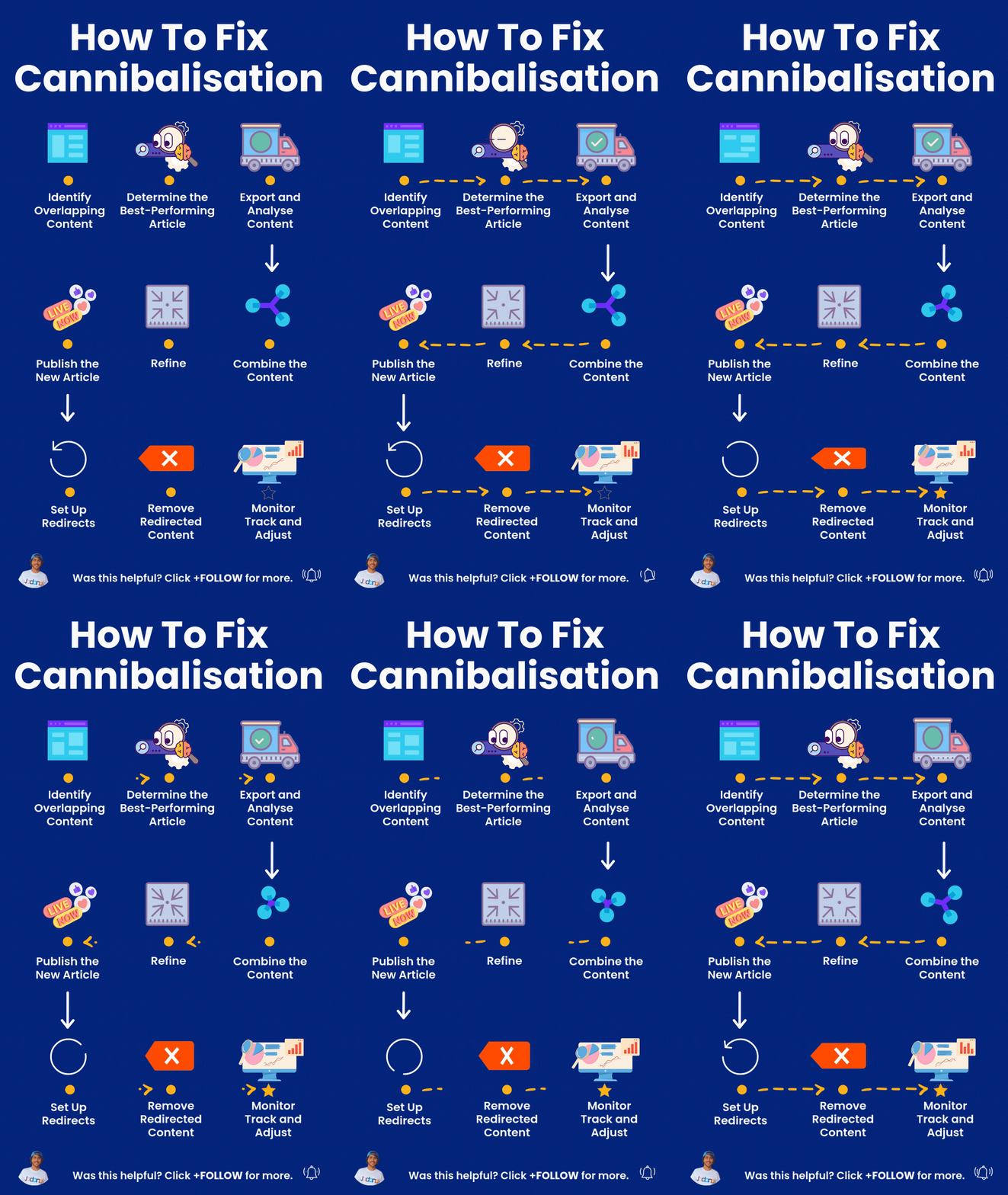
While ChatGPT helped streamline the process, it was not perfect. The generated content often included generic phrases like “ever-evolving digital landscape,” which did not sound natural or specific to the client’s needs. At this point, human involvement is needed. Work with a writer (or the client) to fine-tune the content, ensuring it was accurate, engaging, and aligned with the intended voice.
Once the article was refined, it was time to add it to the website. I uploaded the new content, checking for correct internal and external links, formatting, and ensuring the structure was consistent with the original post.
Now that we had the consolidated article ready, the next step was to set up redirects for the outdated posts. This is where the Redirection plugin for WordPress comes in. It is a simple tool that allows you to map the old URLs (the ones with overlapping content) to the new consolidated article.
I imported a CSV file containing the source URLs (the outdated posts) and the target URL (the new article). After uploading the file into the plugin, I tested the redirects to make sure they were working correctly.
Even though the redirects were in place, the old articles still existed on the website. To avoid confusion, I set the outdated posts to “draft” status in WordPress. This prevents visitors from accessing them while ensuring that Google only sees the new consolidated article.
Once the old posts were drafted and the redirects were working, I had a single authoritative page for the topic, making it much easier for Google to rank the content and for users to find the information they need.
By consolidating the overlapping articles into one comprehensive resource, I was able to eliminate content cannibalisation and improve the site’s SEO performance. The result? A cleaner, more organised website with content that Google can easily prioritise and rank. Traffic and impressions started to improve, and the site’s overall performance got a significant boost.
If you are dealing with content cannibalisation, follow these steps to streamline your site and improve its visibility. If you’d like help, contact us! Consolidating content may take some time, but the long-term benefits-higher rankings, more traffic, and better user experience are worth the effort.